


Solution: hotel-selling agencies with a call center
Calls, WhatsApp and contract details in one place for hotel sales
For agencies that receive hundreds of calls and messages a day and sell contracted hotels. Requests coming in by phone, WhatsApp, Instagram or web form are recorded on the customer’s card. Contracts, stop sales and competitor prices are accessible from the sales screen.
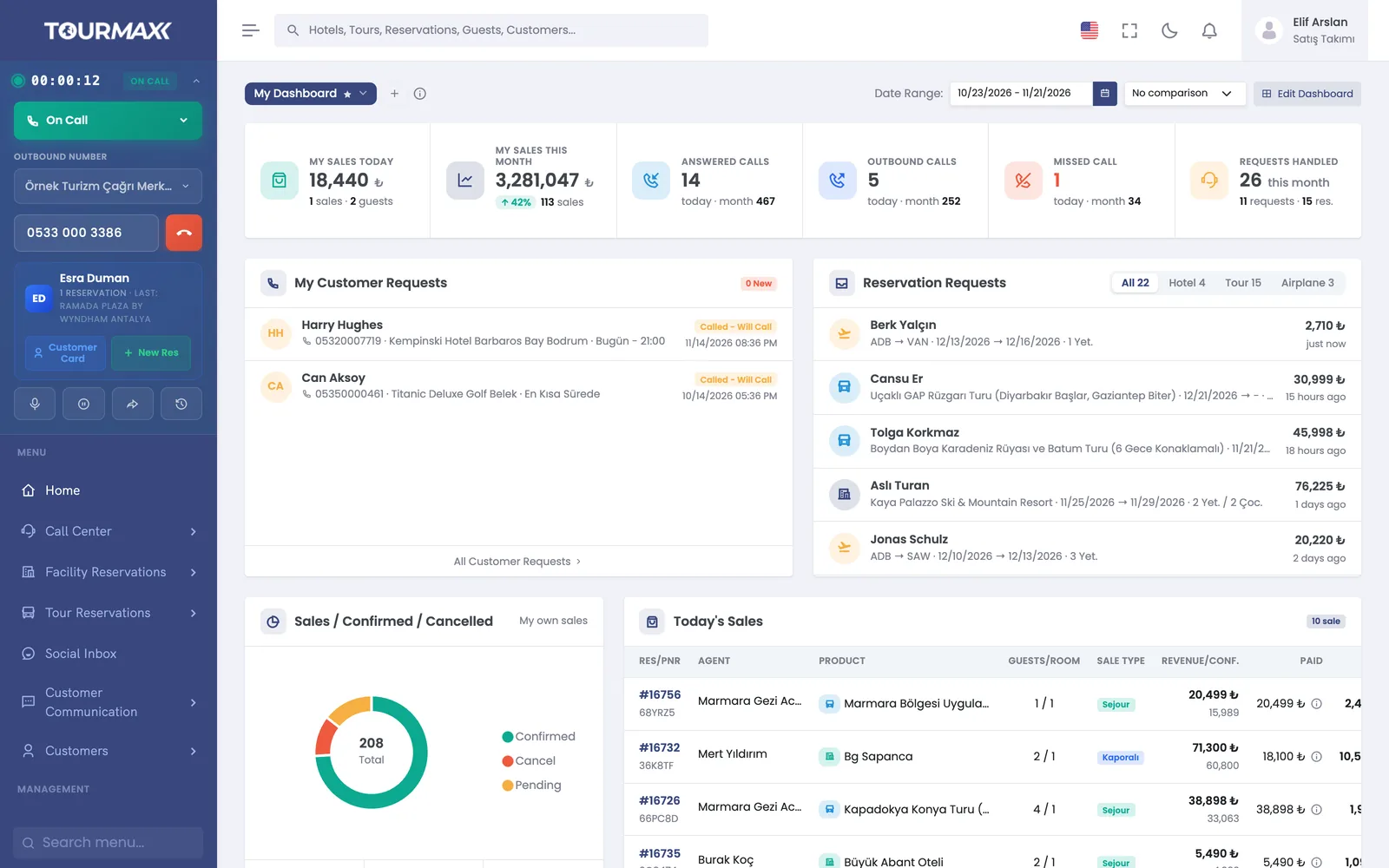 Real screensHome screen: ongoing call, requests and today’s sales

Who this solution is for
Designed for agencies that sell contracted hotels and make most of their sales by phone and WhatsApp. Whichever channel a request comes from, it is added to the same customer card. The sales agent sees the contract, allotment and the property’s confirmation status on the same screen without switching to another program.
- Agencies with several sales agents and heavy call traffic
- Agencies that sell supplier hotels alongside their own contracted hotels
- Sales teams that send quotes via WhatsApp and Instagram
- Managers who want to track competitor channels’ prices regularly
How things work today, and what changes with TourMAX
Calls on the PBX, WhatsApp on a mobile phone, web forms in email. Nobody knows who called whom or who was sent a quote.
Requests from calls, WhatsApp, Instagram and web forms are recorded on the customer’s card. Customer requests are automatically assigned to an available consultant.
Seasonal prices sit in Excel and stop sales arrive by email; sales agents may sell at an outdated price.
The property card has 3 price types, a child discount matrix and a 13-month availability calendar. When a stop sale is entered, the affected rooms and dates are closed for sale on the sales screen and on the site.
You visit sites one by one to see what a competitor charges for this hotel.
Price Comparison shows the price of the same hotel across 9 channels side by side, by property, dates and number of guests. Hotel matching is verified on the first comparison.
Every step of hotel sales in the same system
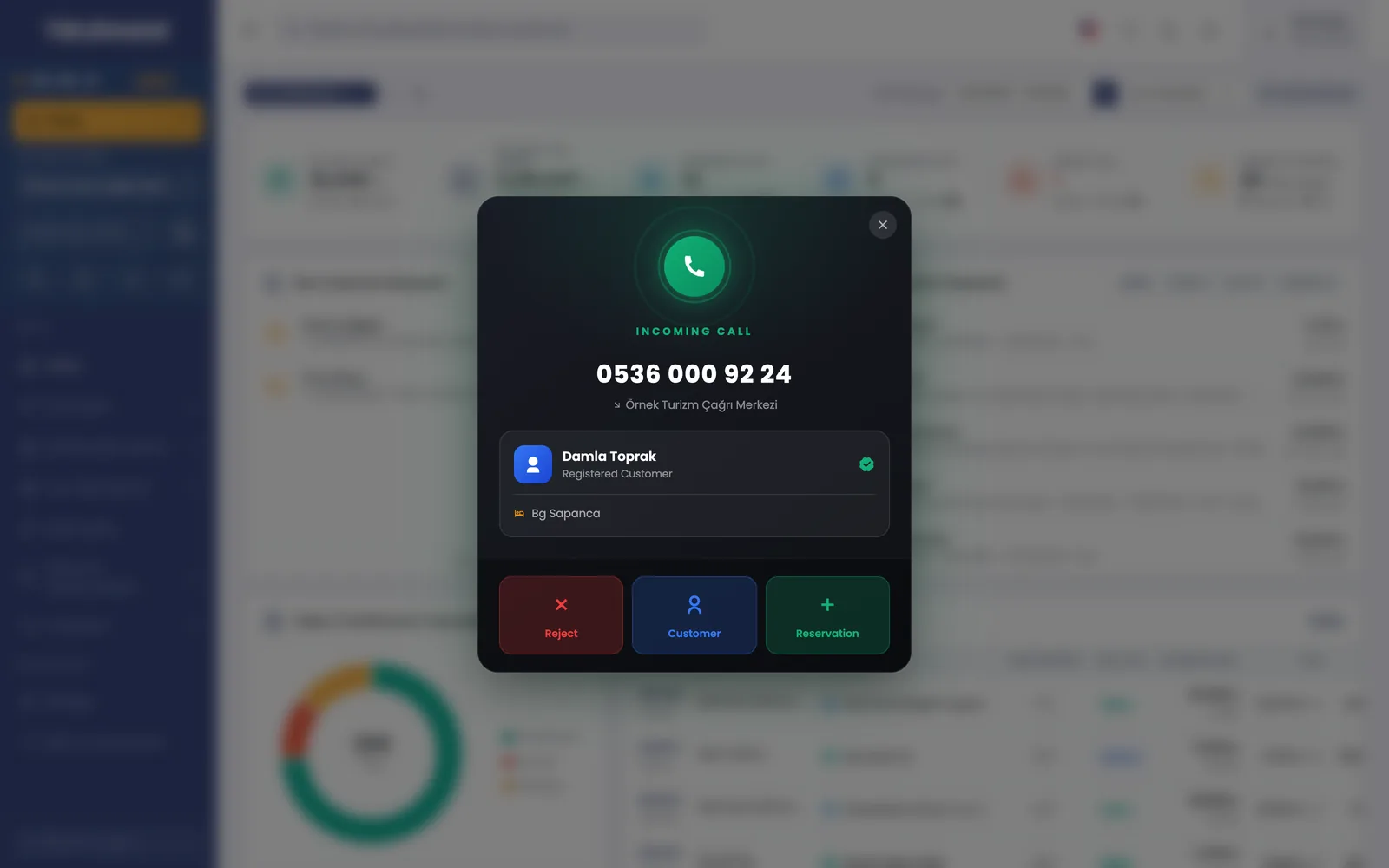
Know who is calling when the phone rings
Your cloud PBX connects to TourMAX, and the agent panel stays open on every page. When a call comes in, the calling customer’s card and latest booking appear on screen. The agent starts the conversation without asking who is calling, and the call note is added to the same card.
- Missed calls are tracked with pending, calling, unreachable and contacted statuses
- The auto dialer calls missed callers back according to a weekly schedule
- Call recordings are played from the list; listening permission is granted per user
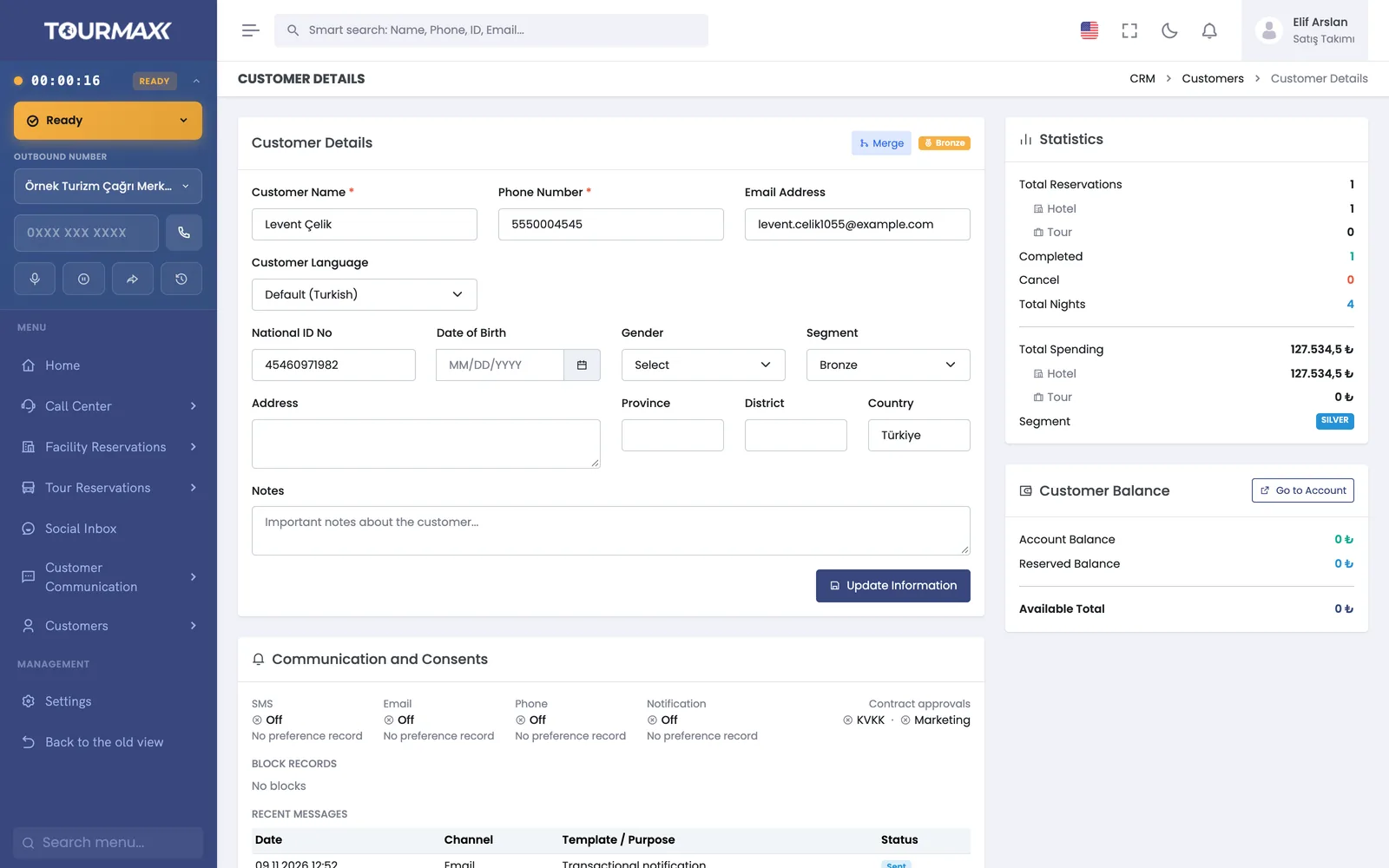
The customer’s history is kept on one card
Bookings, payments, conversation notes and calls come together on the customer card. Even if the agent changes, the card shows what was discussed with the customer before and which price was quoted. “Call me” requests from web forms and the call center are assigned to an available consultant.
- Conversations are recorded with outcome codes such as “price given, thinking it over”
- When the appointment time comes, a reminder window opens
- Duplicate records for the same person are detected and merged
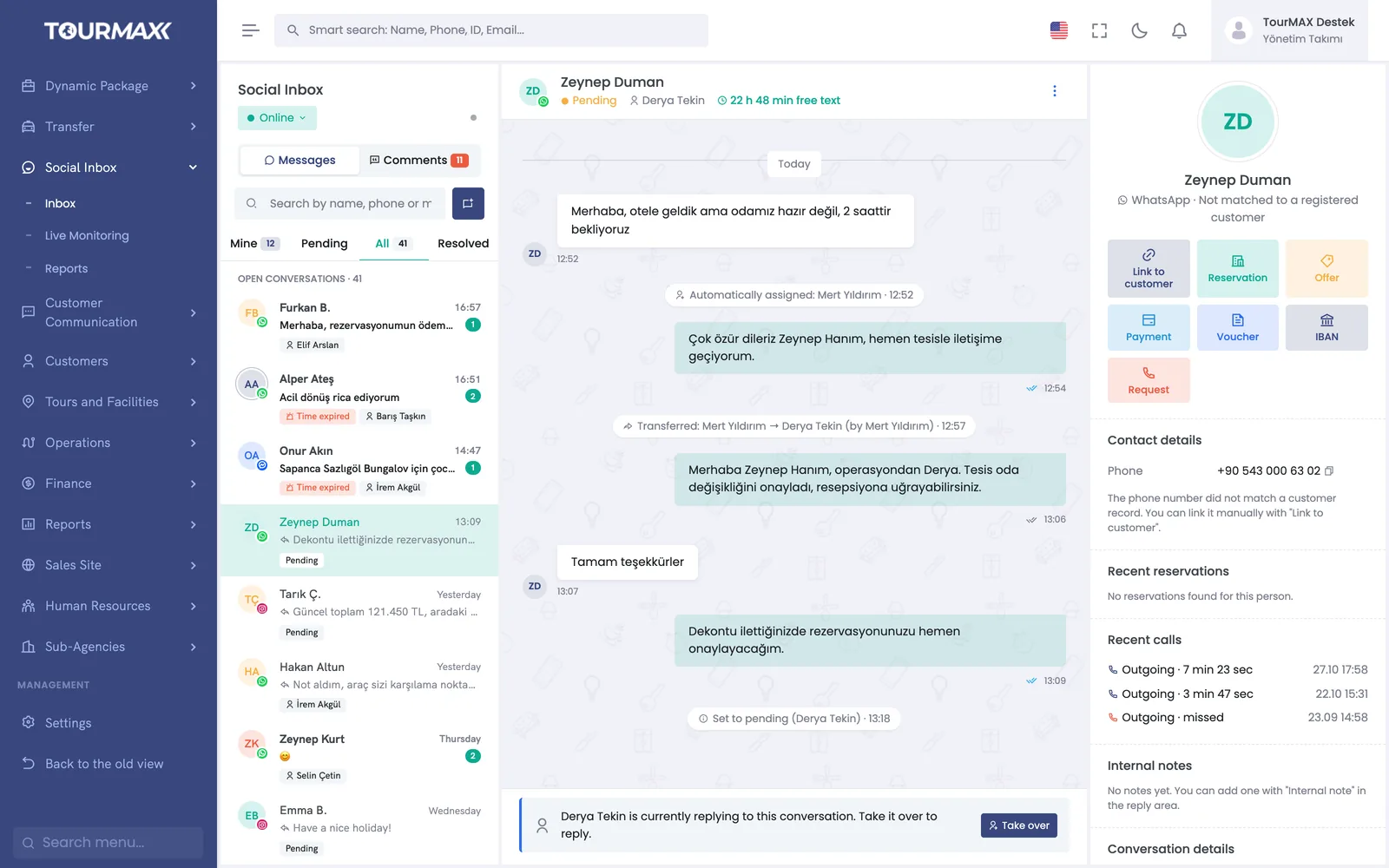
A request that comes in by message turns into a sale within the chat
WhatsApp, Instagram DM and Messenger messages, along with Instagram and Facebook comments, are gathered in one inbox and assigned to an agent. The agent searches for the property from within the chat and sends the price quote and payment link from the same window. Once payment is complete, the booking document (voucher) is also sent through the chat.
- Official WhatsApp Business API and Coexistence: your number stays in use in the app on your phone
- The chat is matched to the customer card, and a customer summary appears alongside
- In conversations past the 24-hour reply window, quotes, payment links, vouchers and IBAN details are sent with approved templates
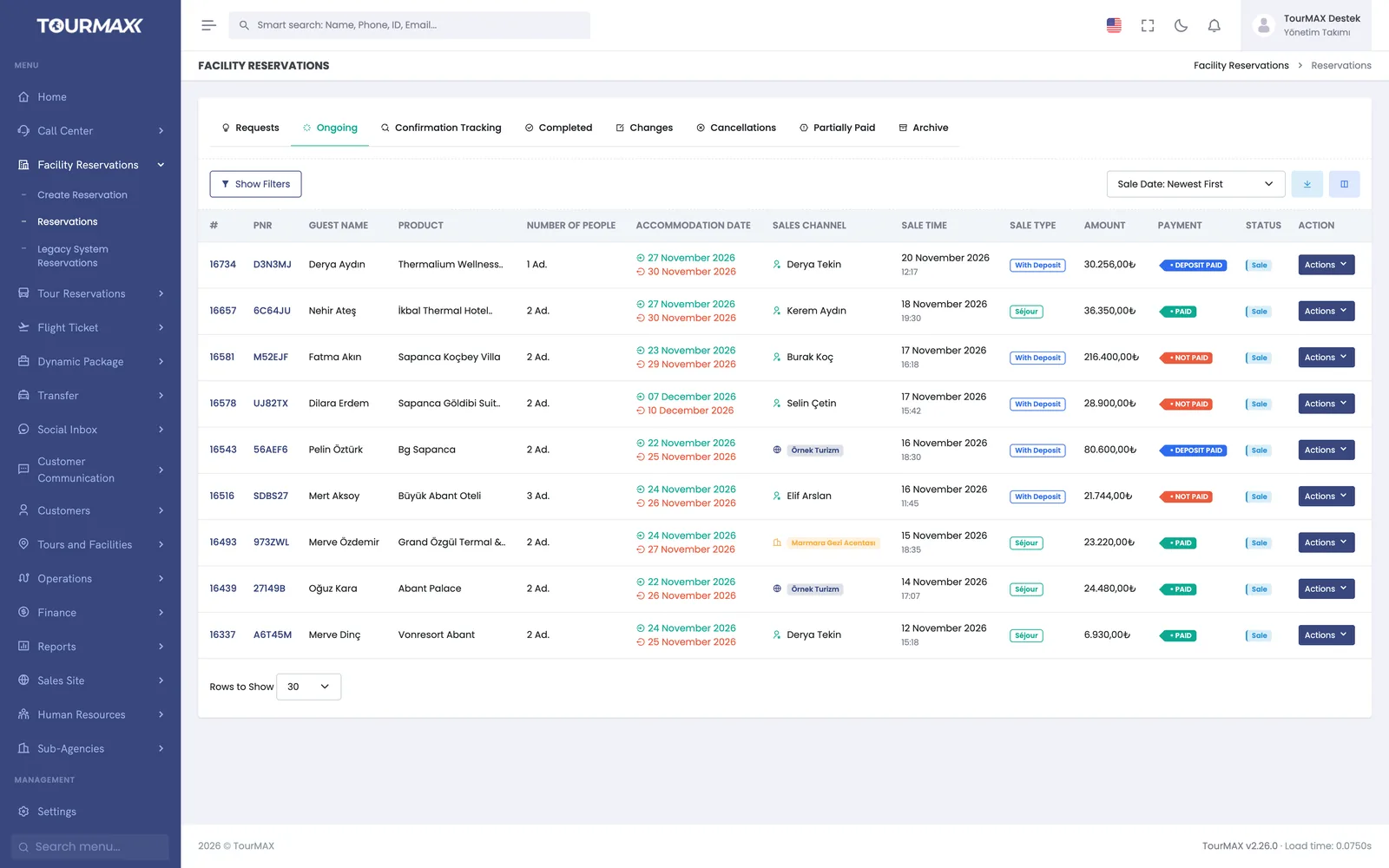
Contracted and supplier hotels are listed in the same search
Your own contracted hotels and hotels from suppliers such as Paximum, WebBeds and RateHawk are listed in the same search results. When you enter the property, dates and guest details, the price is calculated including child discounts. You save the booking and move on to payment.
- 4 payment types: full payment, deposit, pay at the hotel and on-request booking
- 1-12 installments for card payments; the installments offered are set per hotel and room
- Bookings are tracked in 8 tabs, such as requests, in progress and confirmation tracking
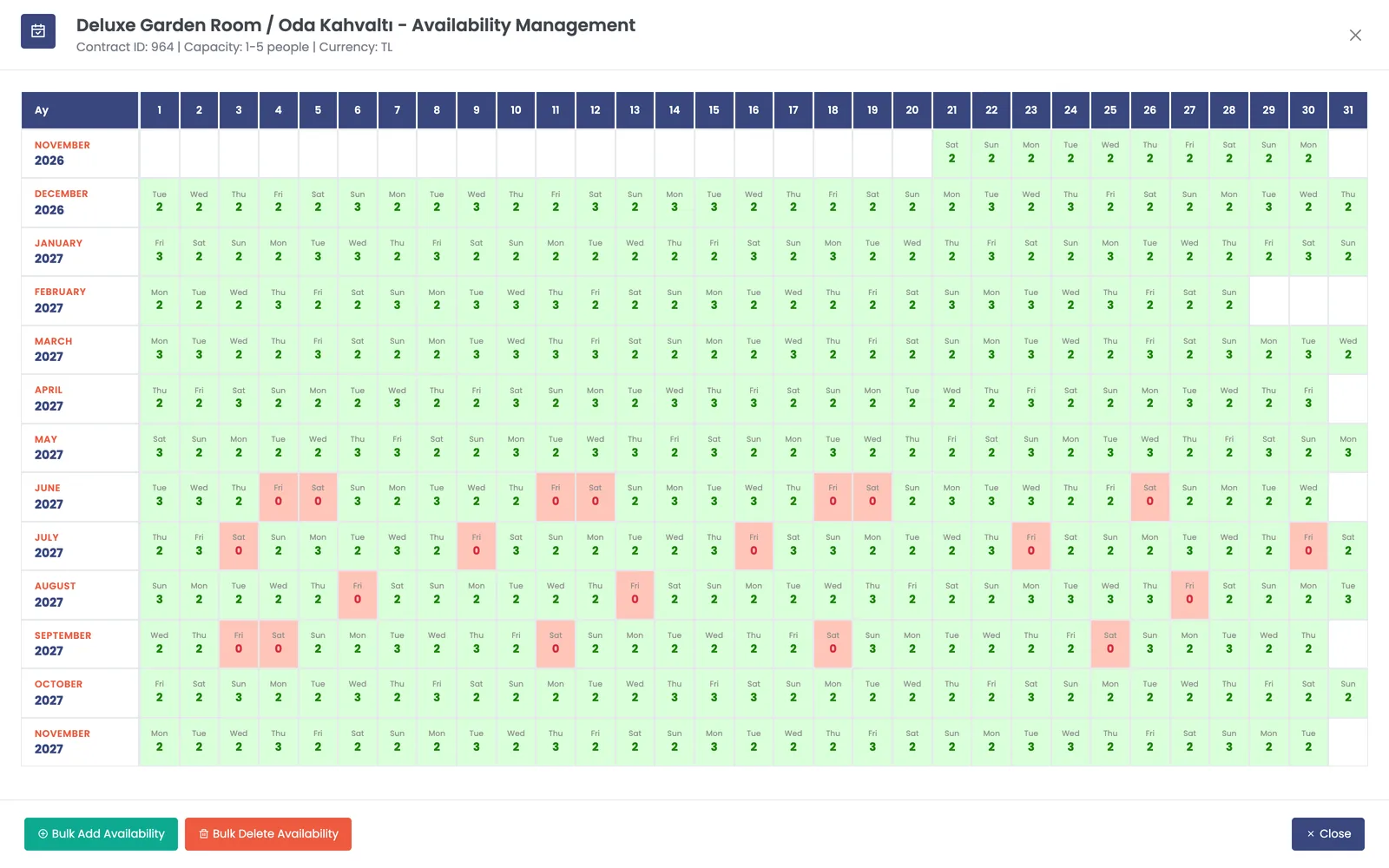
Season prices, allotments and stop sales on the property card
The property’s contracts, promotions and dates closed to sale (stop sale) are kept on the property card. A season price is entered once and copied to the other rooms. Availability is tracked on a calendar that shows this month and the next 12 months day by day. When a stop sale is entered, the affected rooms and dates are closed for sale on the sales screen and on the booking website.
- 3 price types: period, unit and daily pricing
- Child discount matrix by number of adults, child order and age
- 6 discount types and Stay & Pay promotions (for example, stay 7 nights, pay for 6)
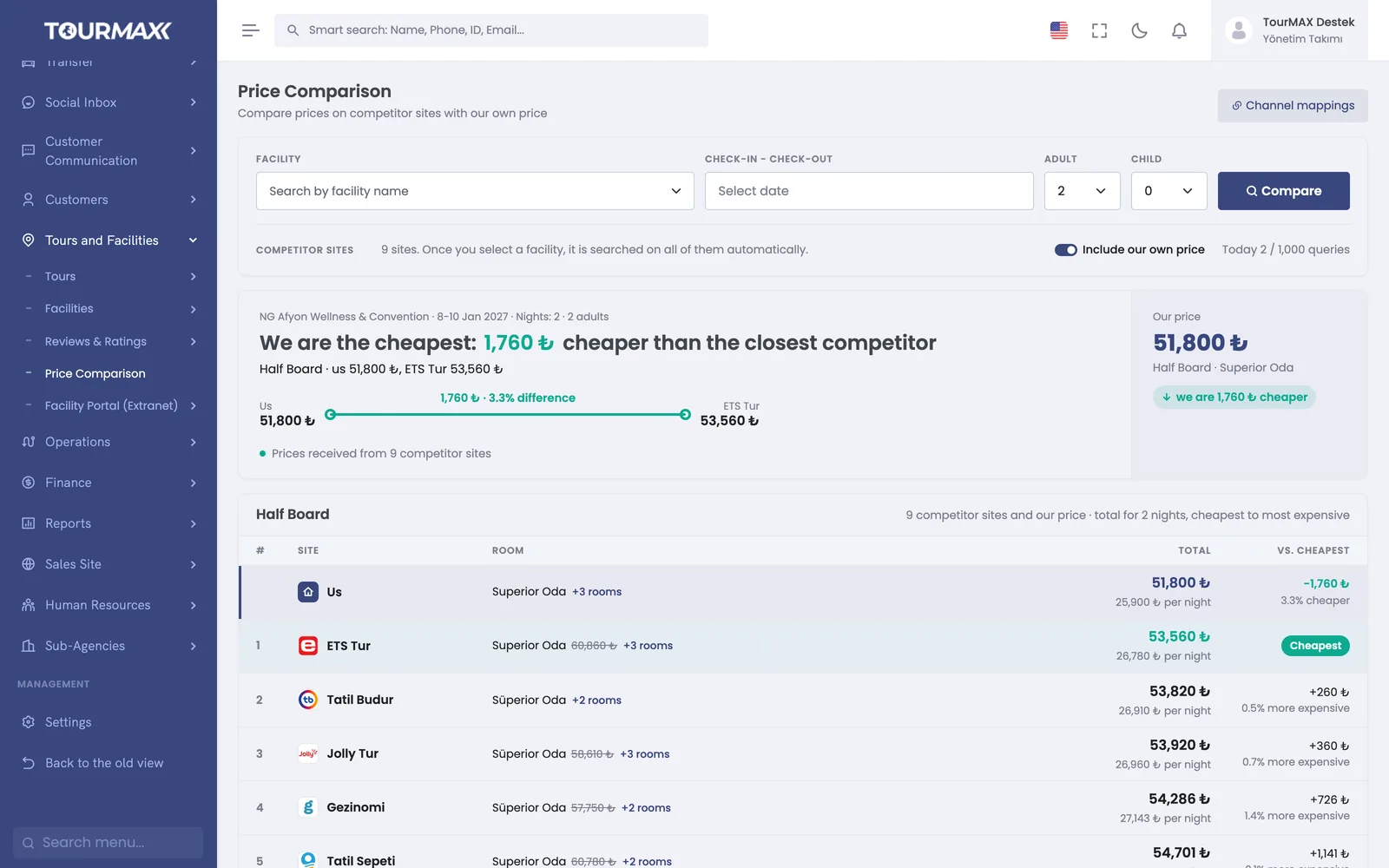
See the same hotel’s price on 9 channels side by side
The Price Comparison screen shows the prices on 9 channels side by side with your own price for the property, dates and number of guests you choose. You don’t need to browse sites one by one to see what a competitor charges for the same hotel. Hotel matching is verified on the first comparison.
- Comparison is made by property, check-in date and number of guests
- Channel mappings are stored with a verification stamp
- The number of queries is limited by a daily quota
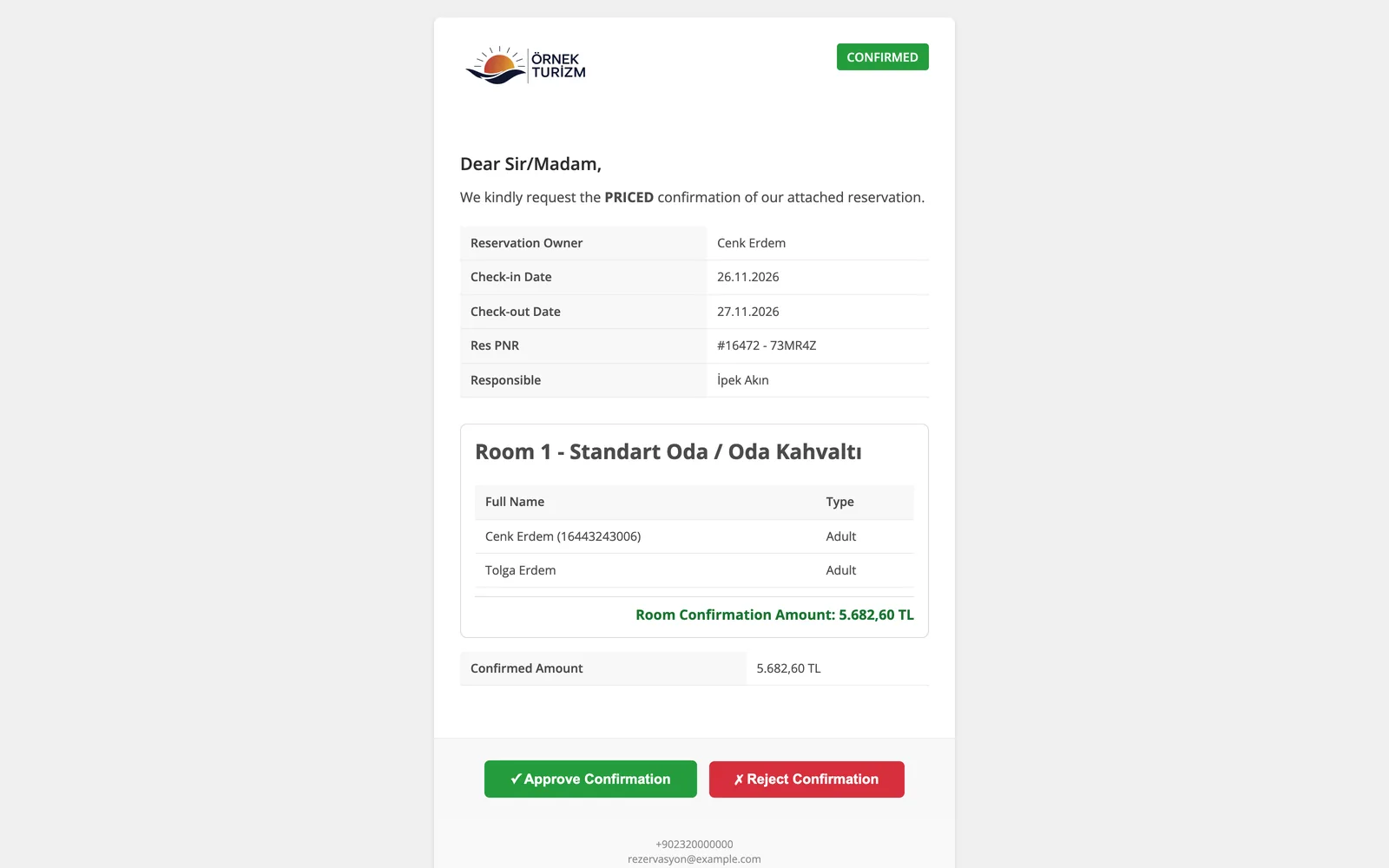
Property confirmation and vouchers go out from the same screen
When a booking is saved, a property confirmation request with the net amount is sent to the property by email or WhatsApp. The front desk opens the secure link and confirms or rejects the request without logging in. Bookings awaiting confirmation are tracked in the confirmation tracking tab.
- 4 types of confirmation documents are ready
- The voucher is prepared in 5 languages and emailed to the customer
- 11 standard cancellation reasons, such as no-show and overbooking, are counted consistently in reports
Managers monitor calls, sales and collections from one place
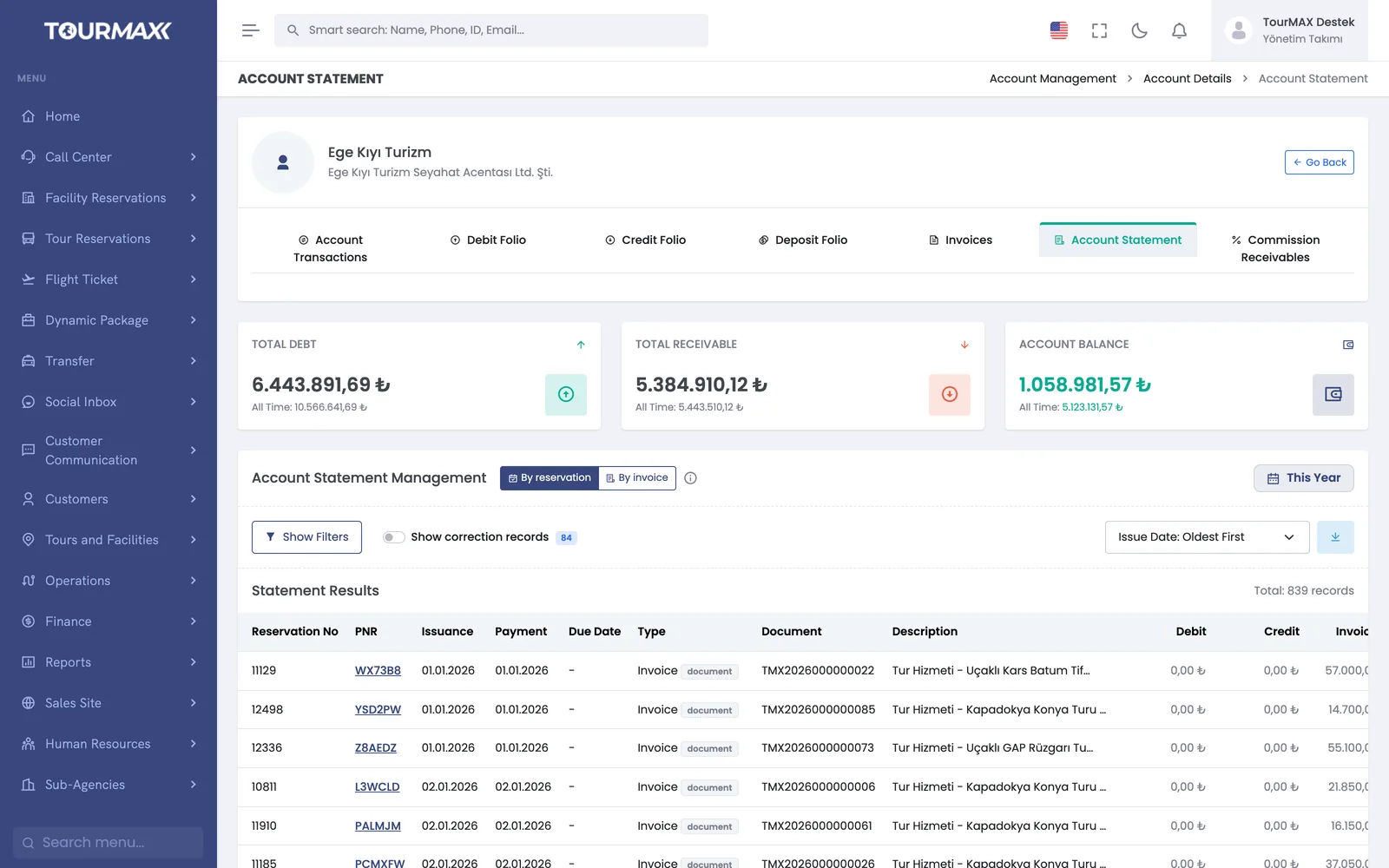
On the live call board (wallboard), the manager sees the queue and agents’ statuses. They can listen in on an ongoing call and, when needed, whisper guidance to the agent without the customer hearing. The day’s sales and collections are tracked on the dashboard, and customer and property accounts in the current account statement. Payments due to properties land in the payment plan according to the agreed terms.
- The answer rate and the share of calls answered within 20 seconds are reported
- E-invoices and e-archive invoices are issued from the booking
- Uninvoiced bookings and bookings with incomplete collections are listed in the control report
- Commission receivables from pay-at-hotel bookings are tracked on the Receivables from Properties page
Call Center
An agent panel on every page; a live call wallboard, call recording playback and missed call tracking.
Learn more →Social Inbox
WhatsApp, Instagram DM, Messenger, and Instagram and Facebook comments are gathered in one inbox; quotes and payment links are sent from the chat.
Learn more →Property Management
Contracts, allotments, promotions and stop sales on the property card; price comparison is done here too.
Learn more →Accounting and Finance
Collections, payment links, e-invoice and e-archive invoice; POS routing and the property payment calendar.
Learn more →Commonly connected integrations






The call center and Social Inbox are included in the Premium plan, and Price Comparison comes with 200 queries per day. Smaller teams can start with the Professional plan and add the call center, Social Inbox and Price Comparison as add-ons.
Compare plans